Security
AI agents are already hunting leaked keys. Check your launch before they do
On November 13, Amazon's threat intelligence team published something unusual: the working notes of attackers' AI agents. Amazon runs a network of decoy sensors called MadPot, and some of them pretended to be LLM inference APIs. Between October 3 and November 5, agents built on ARTEX, an open-source agentic pentesting framework, sent requests to those decoys, and because agents carry their history in every prompt, the requests contained whole campaign logs. You can read the AWS Security Blog write-up yourself. Amazon is careful to say it did not watch the attacks happen and cannot verify what the agents claimed, but the records show what they were after.
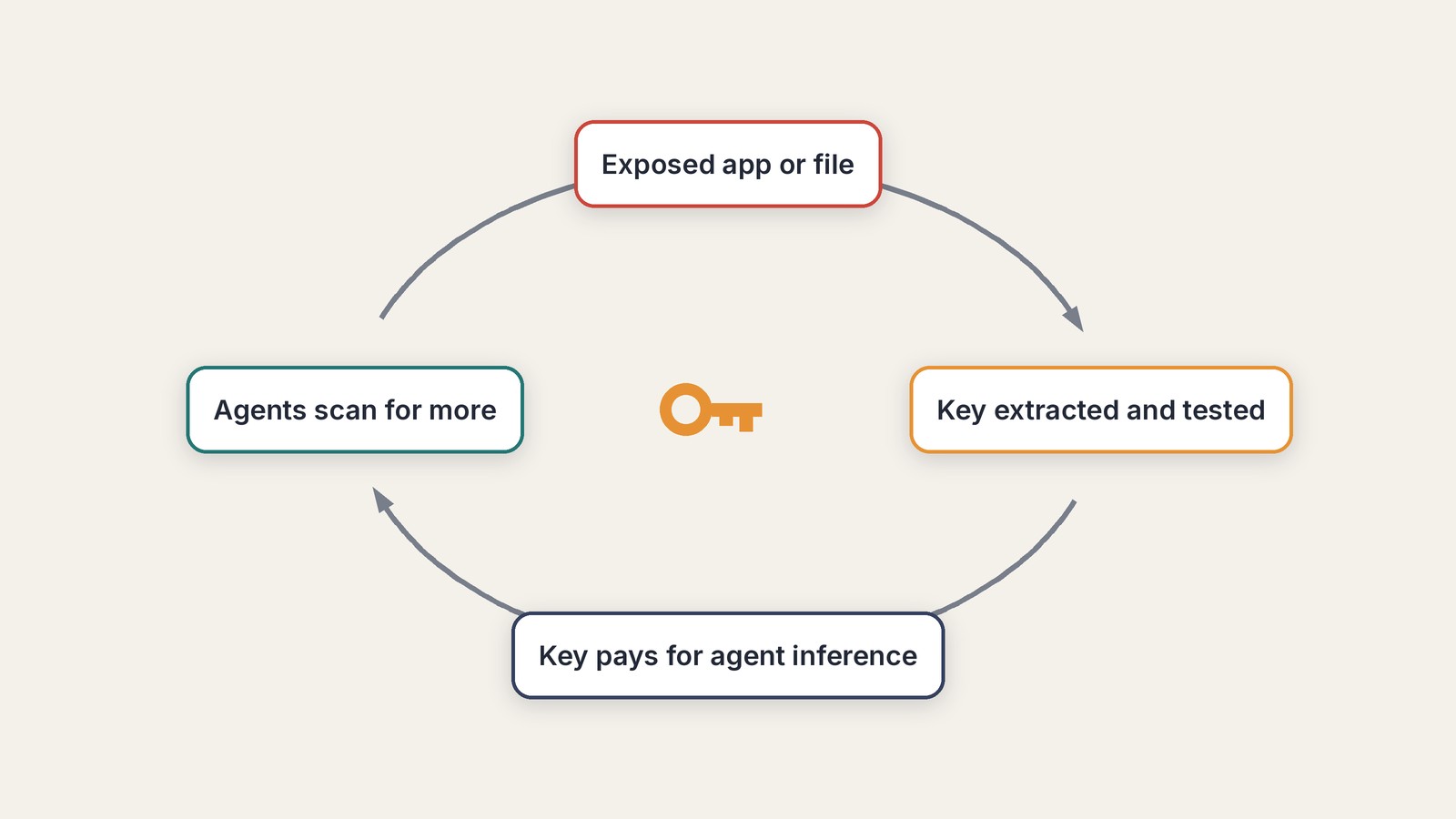
The main campaign was a loop. Find an internet-exposed AI app, pull out the provider keys it holds, check that they work, add them to a pool, and use that pool to pay for the model calls that drive the next round of scanning.
The same day, Cloudflare's Cloudforce One team reported that more than 50 families of AI pentesting frameworks had tried to scan its customers in just three days, from IP addresses that now number in the thousands. In one of its incident investigations, ARTEX got hold of a compromised account-level API token that had been used for CI/CD and had no IP restrictions or rate limit. The Hacker News summarized both reports, including the 400 database dump requests in an hour that followed in the Cloudflare case.
If you ship side projects with Cursor, Claude Code, Lovable or Bolt, the line from Amazon's report that matters is this one: "None of the techniques in these campaigns were new." The agents won where basic hygiene was missing. Default credentials, keys in code and public files, endpoints with no auth, unpatched software. What changed is that someone is now checking for all of it, on every host they can find, without getting bored.
What the agents actually looked for
The playbook in Amazon's report reads like a list of things a vibe-coded app does by accident. For each fingerprinted product it mapped a known entry point: installs left half-finished so an outsider could claim them, management and provider settings endpoints that needed no login, default admin credentials such as LiteLLM's default master key, known CVEs in Langflow and RAGFlow, SSRF through URL-fetch features, and "secrets left in client-side JavaScript, source maps, debug routes, and environment files."
The discovery side is just as plain. Internet scanning services, certificate transparency logs, GitHub repositories and event archives, npm and PyPI tarballs, container image layers, notebooks, paste sites.
Two details changed how I think about launch timing. First, certificate transparency. The moment your host issues a TLS certificate for beta.yourapp.com, that hostname is in a public log. "Nobody knows the URL yet" stopped being true years ago; look your own domain up in a CT viewer such as crt.sh and you will see every preview and staging subdomain you ever put a cert on. Second, the operators told their agents to treat credentials that had been public for more than 30 days as low-value inventory. Fresh leaks are the ones worth stealing. The week you launch is exactly when a mistake is most valuable to them.
Grep the build, not the repo
Most leaked keys in AI-built apps never touch the repo in an obvious way. They get inlined by the bundler. Vite's docs say it plainly: variables prefixed with VITE_ are exposed in client-side code after bundling, and they "should not contain sensitive information such as API keys." Next.js does the same for anything prefixed NEXT_PUBLIC_. If an assistant wrote VITE_OPENAI_API_KEY into your .env to make a fetch work from the browser, that key is public. Renaming it does not help; the call has to move to a server route.
So build the thing you are about to deploy and search the output:
npm run build
grep -rEno 'sk-(proj-|ant-)?[A-Za-z0-9_-]{20,}|sk_live_[A-Za-z0-9]{20,}|rk_live_[A-Za-z0-9]{20,}|sb_secret_[A-Za-z0-9_-]{10,}|AKIA[0-9A-Z]{16}' dist/ .next/static/ 2>/dev/null
That covers OpenAI and Anthropic style keys, Stripe live secret and restricted keys, Supabase's new sb_secret_ keys and AWS access key IDs. Add your own providers. A Stripe pk_live_ or a Supabase publishable key in the bundle is expected; a secret key is not.
Then check what is actually deployed, because the production build is not always the one on your laptop:
SITE=https://your-app.example
curl -s "$SITE" | grep -Eo 'src="/[^"]+\.js"' | cut -d'"' -f2 | sort -u | while read -r p; do
  curl -s "$SITE$p" | grep -Eo 'sk-[A-Za-z0-9_-]{20,}|sk_live_[A-Za-z0-9]{20,}|sb_secret_[A-Za-z0-9_-]{10,}' && echo "  found in $p"
done
This only follows scripts referenced from the homepage HTML, so run it on your main routes too. If it prints anything, rotate the key first and fix the code second. A key that was public for ten minutes should be treated as stolen.
Source maps and files that should 404
Vite's build.sourcemap defaults to false and Next.js disables browser source maps in production unless you set productionBrowserSourceMaps. People turn them on to debug a production error and forget. A public source map hands over your original source, comments and all, which is where a hardcoded fallback key tends to live.
# does the bundle point at a map?
curl -s "$SITE/assets/index-abc123.js" | tail -c 200
# the usual stray files
for p in /.env /.env.local /.env.production /.git/config /api/debug /admin; do
  printf '%-18s ' "$p"; curl -s -o /dev/null -w '%{http_code} %{content_type} %{size_download}\n' "$SITE$p"
done
Read the output carefully. Single-page apps on Vercel, Netlify or Cloudflare Pages often answer every unknown path with 200 text/html and the size of your index page. That is the SPA fallback and it is fine. What you do not want is a 200 with text/plain or application/octet-stream, or a size that differs from the homepage.
Anything with an admin page goes behind a login
A lot of indie AI products now run a self-hosted gateway or builder next to the app: LiteLLM to route between providers, Dify or Langflow for a workflow, Open WebUI for an internal chat. Those are the exact products named in Amazon's report, and they were targeted because each one holds keys for many providers at once. One weak admin page, many accounts.
My rule is simple. If the tool has an admin UI, it is not reachable from the public internet without an identity check in front of it, whether that is Cloudflare Access, Tailscale, or at minimum basic auth on the reverse proxy. Then the specifics: set your own LiteLLM master key and rotate it with the documented procedure if you ever used a sample value; finish the setup wizard of anything you deploy before you expose it; and patch. Langflow's CVE-2025-3248 is fixed in 1.3.0. RAGFlow's CVE-2026-28797 only needs a registered account, and self-registration is on by default.
If you are on Supabase, the equivalent check is Row Level Security. A publishable key in the browser is fine only when every table it can reach has RLS policies. Open the dashboard and look for any table with RLS disabled before you share the link.
Shrink what a stolen key can do
You will not get to zero leaks over the life of a product. Plan for the one that gets out.
Give each project its own provider key instead of reusing the one from your last hackathon. Set a monthly spend limit on every AI provider account that offers one, low enough that a bad night is annoying rather than ruinous; Amazon's advice to watch for "unexpected spend or unusual usage" is only useful if someone gets alerted. For deploy credentials, Cloudflare's write-up is the lesson: the common root cause across several of its investigations was static CI/CD tokens that never expired, and the ARTEX case involved a token that worked from any IP. Cloudflare API tokens support an expiry date and client IP filtering, so use both, and prefer short-lived OIDC credentials in CI where your platform supports them.
What MySiteSure covers here, and what it does not
I would rather be precise about this than oversell it. MySiteSure runs bounded scans of your public site, with no port sweeps or attack payloads, and scores it on reliability, security, performance, SEO and trust using evidence such as TLS, DNS, security headers, metadata, robots.txt and sitemap.xml. Every finding comes with a fix brief you can hand to your coding assistant. That catches the outside-facing half of a launch: missing headers, certificate and DNS mistakes, indexing and metadata problems.
It is not a secret scanner and it will not try to log into your admin panel. The grep and curl checks above are still yours to run. The features page lists what is in the scan, pricing shows what the free homepage scan includes versus Pro, and the FAQ covers scan limits and data handling. If you missed last week's piece on surviving upstream outages, it is here.
The agents in Amazon's logs were patient and cheap to run, and they were paying for themselves with other people's keys. Twenty minutes with the commands above makes sure yours is not one of them.